
Scottsdale AZ Chapter
#3160 Scottsdale Arizona
#3160 Scottsdale Arizona
Ride 365 Tips and Tricks
You can help yourself and help our chapter by doing regular odometer readings for the Ride365 program. You get an H-D point for every mile, up to a max of 15,000 points ($150). If you have a passenger who is also a HOG member and registered in the program, you can double those points to up to $300. Our unaudited total for 2025 was 1,022,454 miles, 7th in the entire U.S.A., and we are looking to beat that in 2026.
The program is based on odometer mileage programs for each of your Harleys. All miles ridden count, including Harleys you rent or ride as a loaner from HDOS service:
- Do an initial mileage reading for each of your Harleys as early in the calendar year as possible
- If you rent a Harley, for example from EagleRider, track the beginning and end odometer readings (and VIN) on the rental receipt and submit that as evidence
- Optional: you can do interim mileage readings throughout the year, to get mileage credit and points sooner
- Do a final mileage reading for each of your Harleys as late in the calendar year as possible
Stop by HDOS and have a reading taken while servicing or shopping. Our HOGMeister Glenn Dusz administers the program for our chapter, so ask him any questions. Also, if you do mileage readings for the "Let's Ride Challenge", those mileage readings will automatically update your Ride365 miles.
Note: H-D is typically about two months behind on doling out the points, which show up in the H-D app, so please be patient. Your miles ridden should show up pretty quickly on the Ride365 website and the H-D app, however. It benefits you to do mileage readings over the course of the year: you get your H-D points sooner, and any problems can be straightened out before the mad rush at the end of December, which is when the H-D mileage system gets locked down for auditing. It is very difficult to try to correct problems in January for the previous year.
You can now check your Ride365 mileage in the H-D app. Open the H-D app on your smartphone, then click "Connect" at the bottom, then click "CHALLENGES" at the top. You should see your yearly and lifetime miles ridden. If you number is zero, it means you either haven't done an initial reading or have only done an initial reading for this year. Submit another mileage reading via the process above, and that number should increase soon.
New 3160 members from other chapters: make sure you make HOG3160 your Ride365 chapter! Only you can do this, and it can only be done on the Ride365 website. Here's the process:
• Go to the Ride365 page (you must be logged in)
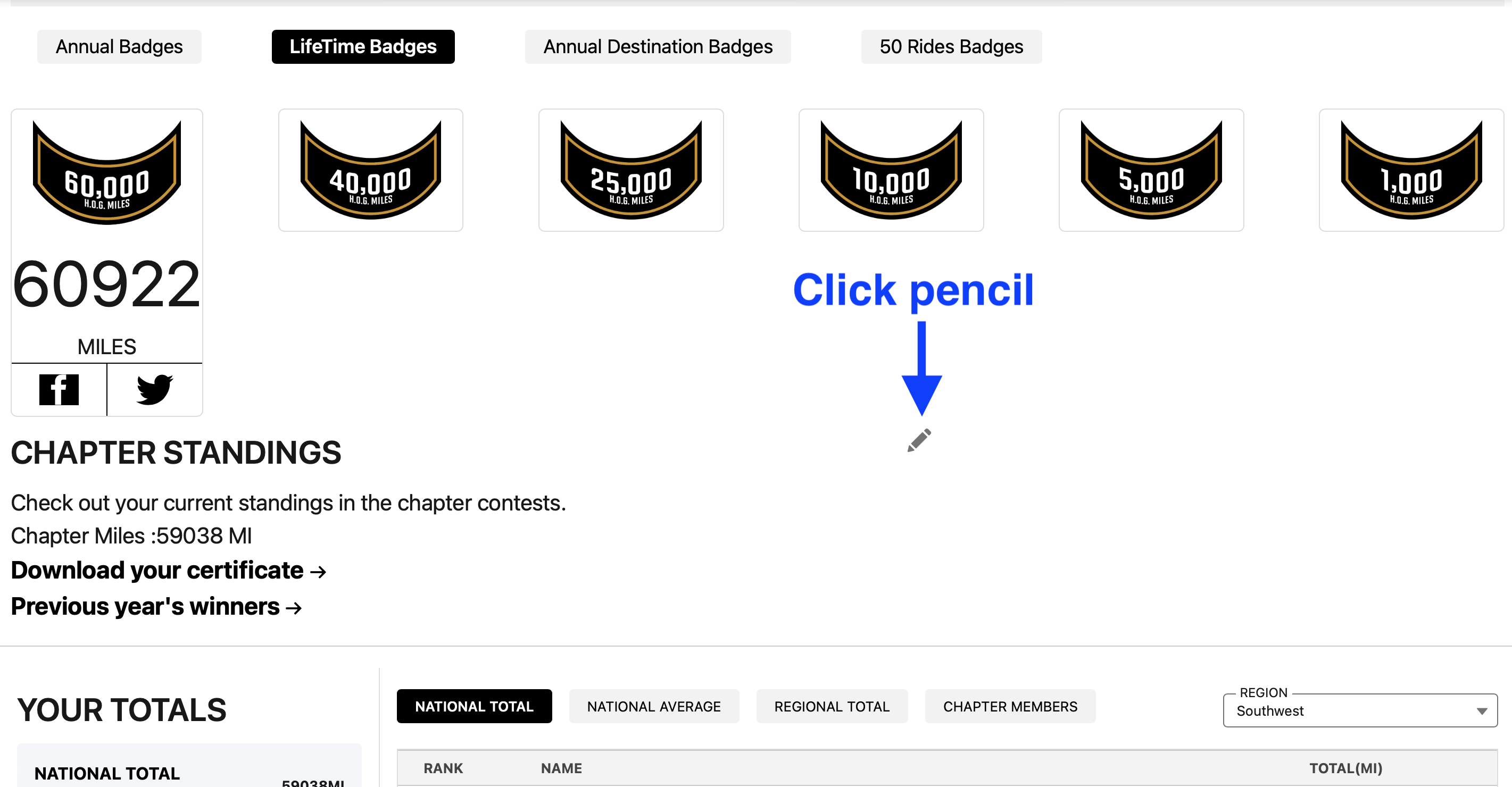
• Scroll down to see your Ride365 statistics and badges you've earned. Note the pencil in the middle of the page - that pencil is the magic key
• Click on the tiny pencil
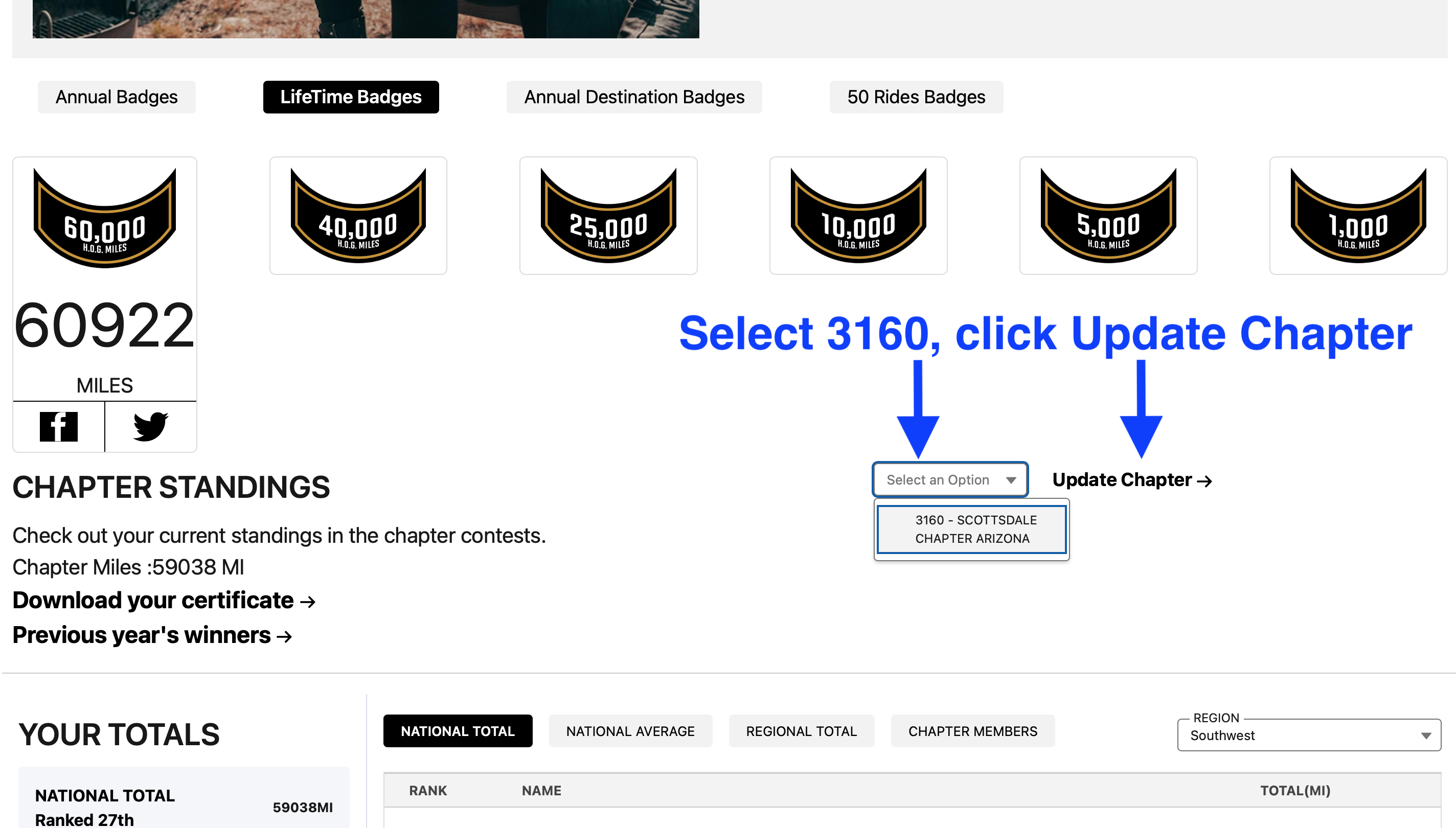
• Select 3160 as your chapter, then click "Update Chapter"
Is this intuitive? No. Is this simple? Only if you know where to look, and now you do. But it is worth doing, as it helps the chapter. If all else fails, you can change your chapter by calling the HOG support line: 1-800-CLUBHOG or 1-800-258-2464.
Further down the Ride365 page you will see sections for the DEALERSHIP PHOTO CHALLENGE, the 15 RIDES FOR '26 CHALLENGE, and the 50 RIDES, ONE NATION CHALLENGE. This is where you submit the photos required for those challenges. For each 50 RIDES, ONE NATION ride that you complete and turn in, you get a really cool coin from H-D, and you also get a coin for each 15 RIDES FOR '26 ride. Check it out and collect those coins!

Posted by Chris Shaver
Regular meetings

Copyright © 2026 - Scottsdale AZ Chapter of Harley Owners Group #3160
Privacy Policy